

KNUST AIM App is currently available for the Android operating system and can be downloaded from the Google Play Store or here. It can also be accessed through a link on the login page of the Online Student Portal. AIM needs an active internet connection for setup and login.
How to Setup and Login KNUST AIM App
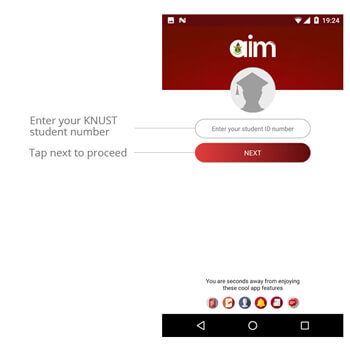
1. Once AIM has been launched, enter student number and tap the NEXT button. AIM will fetch the student name and picture corresponding to the entered student number. Confirm details before continuing. You can press back on your device to re-enter student number if it was wrongly entered.
2. Enter username and password and tap LOGIN button

3. Create a 4-digit pin code. This pin is used to protect sensitive data like results, registration and biodata.

4. Repeat the entered code to confirm.

- Portal Opened: How to register your courses for the semester in Knust
- KNUST Sets 2021/2022 Reopening Date For Continuing Students And Freshers To Report
- Steps to apply for Room using Knust Accommodation Portal As a Fresher