


- Advertisement -
The University for Development Studies (UDS) Student Portal is an essential online platform for students. It provides access to key academic and administrative services, such as course registration, checking results, and fee payment.
This guide outlines how to access and make the most of the portal.
- Advertisement -
READ ALSO:
- List of Campuses of University for Development Studies
- UDS Admission Cut-off Points For Health Sciences Programmes
- 4-Year BSc Dietetics: Admission Requirements and Cut-off Points
Steps to Access the UDS Student Portal
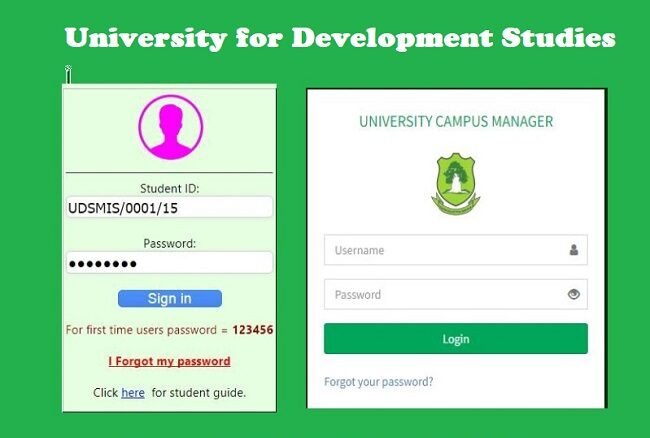
- Visit the Portal Website
Open your browser and go to the official UDS Student Portal at https://mis.uds.edu.gh/signin. - Log In to Your Account
- Enter your Student ID and Password in the login section.
- For first-time users, your default password is often provided during admission. Ensure you change it after logging in for the first time to secure your account.
- Navigate the Dashboard
Once logged in, you’ll be directed to the dashboard, where you can access various services.
Key Features of the UDS Student Portal
- Course Registration
- View available courses and register for your current semester.
- Ensure your course registration aligns with your academic plan.
- Check Academic Results
- Access your exam grades and academic performance reports.
- You can also download or print your results for reference.
- Fee Payments
- View your fee statement and make payments securely through the portal.
- Confirm your payment history to avoid discrepancies.
- Update Personal Information
- Keep your contact and personal details updated to ensure you receive important communications.
- Announcements and Notices
- Stay informed about university news, events, and academic schedules.
Tips for Using the Portal
- Ensure Stable Internet Access: A reliable connection will make navigation smoother.
- Log Out After Use: Always log out to secure your account, especially when using shared devices.
- Contact Support: For login issues or technical assistance, contact the UDS IT Support Team.
The UDS Student Portal is a convenient tool to manage your academic journey. Familiarize yourself with its features to enhance your university experience.
- Advertisement -
For more information, visit the UDS website or contact your faculty office.
Source: knustnoticeboard.info
- Advertisement -